
Team plans and billing
How plans, add-ons, limits and cards attach to the team, who can manage them, and what a team without a plan can do.
Plans, prices per country and interval, add-ons, limits, the payment page and the admin forms work the same as in every Weblabor product. See Turn on plans and billing and Create and price a plan on the base's site for all of that. This guide covers only what changes when the customer is a team.
The team is the customer
The team pays, not the person. Each team has its own subscription, its own cards, its own invoices and its own add-ons. Nothing about billing is stored on the person, so a member who leaves the team takes nothing of the team's plan with them.
Where the team manages it
| Screen | What it does |
|---|---|
| My plans | The plans, with the team's current one marked. A free plan is subscribed on the spot; a paid one opens the payment page. |
| Add-ons | The add-ons catalog, with the team's active ones. When the team has metered usage, its balances are shown above the catalog. |
| An add-on's page | Every way to get that add-on, the button that gets it, and a link back to the team's catalog. |
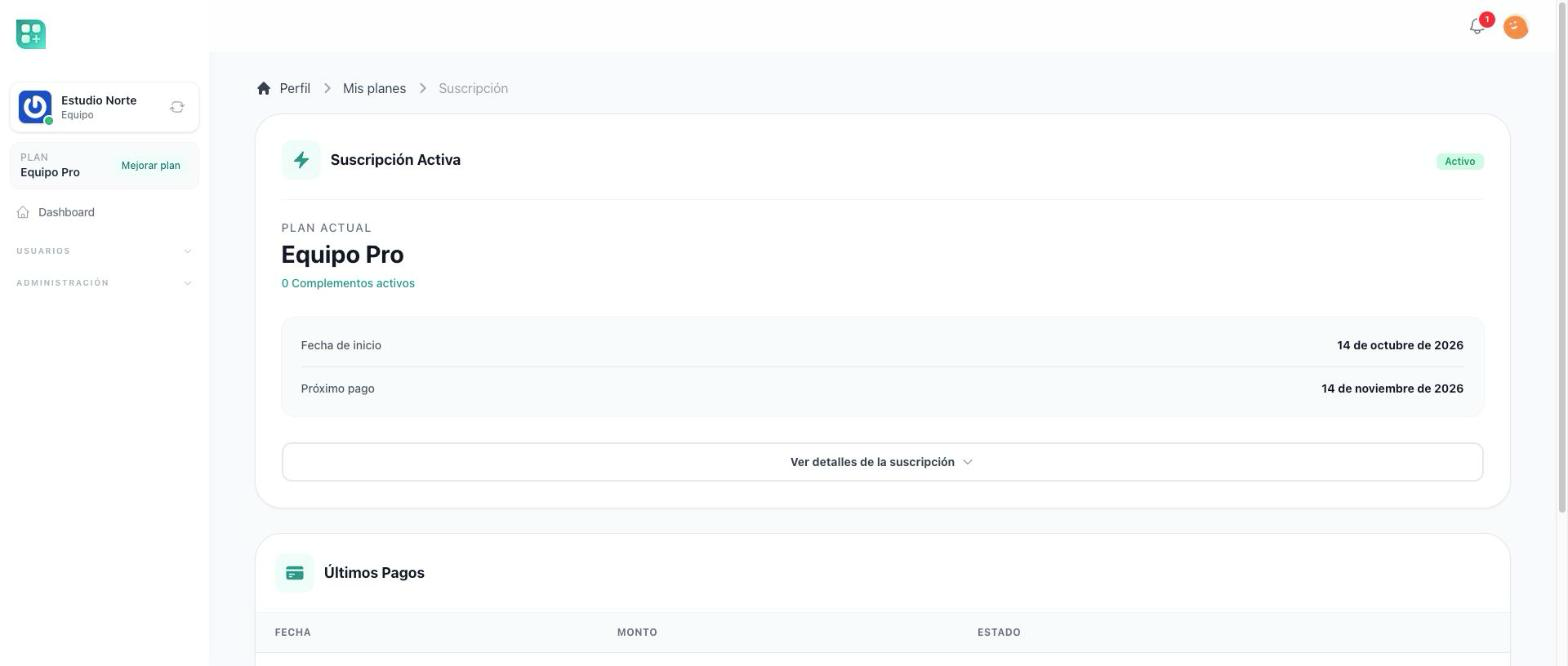
| Billing | The subscription's state, the next payment, the invoices, the link to manage the payment details, the team's credit balance when it has any, and the history of its subscription. |
| Payment methods | The team's cards. |
| Outstanding balance | What the team owes and the button to settle it. The team is sent here when it owes money. |
None of these requires a subscription, so a team whose plan ended, or that owes money, can still reach them and pay. The owner and the roles with Manage Plans see them; everyone else is sent back to the team dashboard with a message saying to ask a team administrator for access, and the menu does not offer them the links in the first place. For those who manage plans, the team menu's Billing group shows Add-ons right after My plans whenever add-ons are on and the team's catalog has something to show. With an empty catalog the link stays hidden.
Each of these belongs to the team, not to whoever opens it. A member who also pays for a personal account of their own never lands on their own billing pages from inside a team: the add-ons, their pages and the return from the payment page all stay on the team that is active.
The free plan
When plans are on, a team with no active plan is put on the free plan without asking: when the team is created, when its subscription ends, then once a day while it stays without one, and whenever its dashboard opens. The free plan is the one of the team's country — the country saved on the team, otherwise its owner's, otherwise the general free plan. It is never guessed from where the visitor is connecting.
The free plan is not guaranteed. When there is no free plan for the team's country, when the team uses more than the free plan allows, or when the free plan could not be activated, the team stays without a plan, and every member sees a warning saying which of those it was. Only whoever manages the team's plan gets Go to plans; everyone else is told that whoever manages the plan has to resolve it.
A team without a plan gets nothing from one: every limit counts as zero. Nobody can be added or invited, and no file can be uploaded. Its screens stay open, so its members, roles and files can still be reached. When your account is left without a plan on the base's site explains each reason and the way back.
Limits counted per team
The plan's limits are set in the admin panel. A team product counts three of them out of the box:
| Limit, as the admin panel names it | What it counts |
|---|---|
| users | The team's members plus its pending invitations. |
| activity_logs | The activity history entries recorded on the team in the current month. |
| Disk space (disk_space) | The space the team's files take up, in your product's unit for disk space. See Team files and space. |
The team's Dashboard shows every limit with what the team has used; there the users limit is called Members. At the users limit the Create member button on the members list is disabled, and the form refuses again on save.
Selling members beyond the plan
A free plan, a paid plan with ten members included and an Extra member add-on charged by the unit are three records created in the admin panel:
| Record | Where | What to set |
|---|---|---|
| Free plan | The admin panel's plans | No price. Under Capacity and limits, users = 1. |
| Paid plan | The admin panel's plans | A monthly price, say $20 USD. Under Capacity and limits, users = 10. |
| Extra member | The admin panel's add-ons | Sold per unit on. Under Limits, users = 1. A monthly price per unit, say $1 USD. |
The limit is called users, not "members", in the admin panel. Sold per unit is what makes the quantity matter — the team picks how many it wants, and the price and the limits multiply by it. An add-on sold per unit has to carry at least one limit, which is what the users row is for; it needs no capability, so leave Capability empty.
When the product sells only to teams, the admin forms of plans, add-ons and meters show no Context field, and the add-on reaches the team's catalog as it is. That field appears only when the product sells to people and to teams, as the last section of this guide describes, and there you pick Team.
Once the three records exist, a team on the paid plan holding four units of Extra member has fourteen places. Adding a fifteenth member, or inviting one, is refused with "You have reached the maximum number of members allowed by your subscription". The team gets past it by buying more units from Add-ons or by moving to a larger plan, and the new places count from that moment. A pending invitation holds a place exactly like an active member, and whoever created the team already holds one — which is why a team on the free plan of this example cannot invite anybody until it buys a unit.
Selling by the unit works the same everywhere, and it is documented in Sell add-ons, under "Per unit and by tiers".
Add-ons and capabilities
An add-on switches a capability on for the team: a feature the team can use once it buys the add-on, or once its plan includes it. The admin picks the capability in the add-on form, from the list your product declares. A capability bought for life stays on even if the plan later stops including the add-on.
From the admin panel
The admin panel's Teams shows each team with its plan and lets an administrator switch an add-on on or off for it, set it a custom limit, agree a lower price with it, give it credit or read the history of its subscription, from the same panels used for people. See Teams in the admin panel.
Selling to people and to teams
A product can sell to people and to teams at the same time. Then the person's own billing pages come back in their account, the team's pages stay for the team, and each plan, add-on and meter declares in its admin form, under Context, whether it is for users (User), for teams (Team) or for both (Both).
For developers
-
The team adapter is
packages/billing-team, next to the base'spackages/billing-core. The base bills aUser; this adapter bills aTeam, with its ownBillingAccountrow, Stripe customer, subscription and entitlements.BILLING_TEAM_ENABLED=true BILLING_USER_ENABLED=falseBILLING_TEAM_ENABLEDregisters the team adapter.BILLING_USER_ENABLEDregisters the base's user adapter next to it, which you only want when your product sells to people and to teams; as shipped it is off, so/account/plansand the other account billing pages do not exist.FEATURE_PLANS_ENABLEDandFEATURE_ADDONS_ENABLEDstill turn plans and add-ons on or off for everybody. The Context field of the plan, add-on and meter forms is drawn only when two or more billing adapters are registered (BillingManager::contextOptions()returns nothing otherwise), so it appears on all three forms once the user adapter is registered beside the team's, and on none of them with the team adapter alone. -
The team's screens are
/team/plans,/team/add-ons,/team/add-ons/{addon},/team/billing,/team/payment-methodsand/team/debt, behindmanage planson theteamguard. The Add-ons link shows when the catalog has an add-on sold in the team's country or priced for every country, or a meter. -
The free plan is applied when the team is created (
TeamObserver::created()callsTeam::returnToFreePlan()), when the subscription ends, by a daily check, and when/teamopens. -
What each limit counts is
app/Classes/TeamPlanLimits.php, the team's version of the base'sPlanLimits; the admin lists its method names as they are written. Add a public method per limit your product needs (users,activity_logsanddisk_spaceship with it), with the key as its name and the current team as its optional argument, and aDailyvariant when you want it on the usage charts:public function projects(?object $owner = null) { $team = $owner ?? team(); return $team ? $team->projects()->count() : 0; }team()->reachedLimit('users')answers whether the team is at the limit; the members list calls it to disable Create member, and the add-member form calls it again before saving. -
The capabilities a team can buy are public methods of
app/Classes/TeamPlanFeatures.php, the team's version of the base'sPlanFeatures; the method name is the feature key the admin picks, and the method answers whether the capability is released in code. The class ships empty, so declare one before creating an add-on for teams:public function advancedReports() { return true; }Check it with
team()->hasFeature('advancedReports'), a permanent synonym ofteam()->hasAddOn(): same key, same answer from the same sources. Teams adds the same synonym on the user, so$user->hasFeature()asks a person's own plan the same way, and neither name reads thefeaturescache. A policy does not call it: declareprotected $requiredFeatureon the policy andApp\Policies\BasePolicychecks the team's entitlements for that key by itself, before any of the policy's own methods run. A visitor with no current team is denied there: no team means no entitlements to read. The team'sfeaturescolumn is a cache the billing account keeps up to date; the decision is always the account's entitlements. -
The admin's teams resource is
/admin/teams.